— The image quality a camera can deliver, and the image quality a photograph needs, turned out to be two different things.
The First Thing That Changed When I Bought a High-Megapixel Camera
At the end of the previous article, I wrote that once the lens alone stops being the answer, the next question becomes: in today's high-resolution systems, what else besides the lens decides the image? The tripod, the ISO, the aperture, the shutter? This article is about that.
Let me first write down the story a reader is likely to have in mind. A high-megapixel camera is hard to get the most out of. Put it on a tripod, set the ISO to its lowest, keep the aperture wider than f/8, use a fast shutter, and if possible shoot in High Resolution mode. Only then do you get the “best” image quality. — That, I think, is probably the story you are expecting.
My side of the story starts from somewhere much plainer.
There was something I expected from a high-megapixel camera, certainly. It would stand up to big enlargements. I did think that was there. But most of my work goes into magazines. For a magazine page, that many megapixels is simply overkill, and honestly, in terms of what I would actually get out of it, I had no expectations. It is the same as being told “this car can do 500 km/h!” — a spec an ordinary driver has no use for.
So what was the first thing that changed once I actually started using one? It was not how I shoot.
Just one thing: “Whoa — the files are huge!!” That was all.
Each file is heavy. It eats up hard-drive space. The first change a high-megapixel camera brought me was that.
“I Thought the Rendering Would Change More”
Let me talk a little more about the photographs themselves.
Before I used a high-megapixel camera, I had thought the rendering would change more. What actually happened? It just records finer detail. The look does not change. It was not the kind of change I had known on film, going from 35mm to 6×9, where you feel you have moved into a different league.
Sand, fresh snow, the twigs and leaves of trees. Things like that really do show finer detail. But that is “the same image, recorded in finer slices,” not a change in the image the lens makes. As for blur and focus, I have no experience of a high-megapixel camera making any particular difference.
I have also had occasions to enlarge big. Sample images from the K-1 were shown as large prints at CP+. At a venue like an exhibition, I think high megapixels do mean something. But if you ask me whether 24 megapixels would look inferior at an exhibition, my answer is that I do not think they could be told apart. Personally, at ordinary print sizes — up to about B0 — I think there is little difference. As the print gets bigger, a difference would probably appear.
The story of how photographs from a cheap kit lens surprised people at a camera maker is in the previous article, so I will not repeat it here.
Let Me Give the Answer Here
If someone asks me “what decides the best image quality in 2026,” this is what I answer today.
It is not decided by the ceiling of what the camera can deliver. It is decided when you first settle on the image quality that particular photograph needs, and then allocate the tripod, the ISO, the aperture, the shutter and any multi-shot compositing toward it.
This does not mean high megapixels are pointless. The ceiling has certainly gone up. How finely a camera can record today is beyond comparison with when I started using digital. But how much of that ceiling gets used is decided by the photograph. A magazine page, a monitor, or a B0 print (a roughly 1 × 1.4 m print)? Something moving, or something still? Deep focus, or shallow? Unless you settle that first, a “setting for the best image quality” does not, in fact, exist.
From the sources' side, let me also give the answer up front. The image quality of today's high-megapixel systems is decided by every stage acting in turn: the amount of light, the lens and the aperture, focus and blur and support, how the sensor slices the image, the processing that follows, and finally the output and the viewing conditions. Push one stage's number to its best, and most of what was lost at another stage does not come back. In this series I will call this “allocation.” That is this series' way of putting it, not a term the photographic world has long used.
So the story the reader imagined — tripod, lowest ISO, f/8 or wider, fast shutter — turns out to be not a list of requirements but a list of tools, each with conditions under which it works and conditions under which it does not. Let me go through them in turn.
Are a Tripod, Low ISO, the Aperture and the Shutter “Necessary”?
Let me set down my starting point. Basically: ISO 100, f/8, aperture priority, tripod as a must. That is my default. Portraits and starscapes have a different default. From there, the question is how I want that particular shot to come out; I change the settings with the final picture in mind. Would a shallower aperture be better, or a deeper one? If that looks like it will lead to shake, I raise the ISO.
The other way around: if I want a slow shutter and ISO 100 is not enough, I use an ND filter. If even that is not enough, I go as far as expanded ISO 50, or f/22 — knowing that both come at a cost. I wrote in another article why I basically do not use expanded ISO. That is the everyday case; what I am describing here is the exception, for when the photograph I need cannot be taken any other way.
Did I change this default when I moved to high megapixels? Nothing in particular. Push it to the extreme, and nothing has changed since my 4×5 days.
You often hear that shake stands out more with high megapixels. As I understand it, that is only half right. It is true that even the slightest shake tends to show. At 100% view, the same shake appears in finer slices. But the shake itself happens regardless of the megapixel count. How much the camera moved, how much the subject moved, the exposure time — if those are the same, the blur on the image is the same, and it does not get bigger because the pixels got finer. Finer pixels only show the blur that is already there more finely.
So this is how I think about it. Whether the camera is high-megapixel or not hardly matters. Otherwise it slides toward “so if it isn't high-megapixel, I can shoot carelessly?” There is no reason to change the standard of how I shoot according to the megapixel count.
On tripods, it comes to this. Unless it is a portrait, a snapshot, a school sports day, that kind of shooting, I basically use a tripod. When I shoot handheld, I choose a shutter speed that will not give me camera shake or subject blur. Use a tripod properly, and you will almost never get shake. When you get shake even on a tripod, the cause is a flimsy tripod, or not using a cable release — not shooting properly. In strong wind, I set the camera on the tripod and then hold the whole thing against my body. The same as in my 4×5 days. A way of shooting that worked on 4×5 and then failed on digital — I have not experienced that.
But let me add the sources' side here too. A tripod works on a subject that is standing still. Moving things are not stopped by a tripod. Wind, resonance and the time it takes to set up are the tripod's own costs. So the phrase “use a tripod and you get the best image quality” does not hold. The same point, written from the side of gathering light, is in a separate article. Stopping things that move, like stars, is in another article.
On image stabilization, just one thing. When the camera goes on a tripod, I switch stabilization off. For me that is standard practice. Some recent models have a function that switches stabilization off automatically when you use a tripod, but if yours does not… the stabilizer turns into a shake generator. — That is what I have been saying. To be honest, let me add that this is something I have actually experienced and also something I knew as standard practice. But if you ask me when, and on which camera, I no longer remember. Nor can I say for sure it was the stabilizer's doing. There is little reproducibility to it. Shoot with stabilization on, on a tripod with a cable release, and the rate of shaken frames goes up. It is purely how it feels in practice; hard to put a number on, and hard to prove. Even so, my conclusion is that I see no need to go out of my way to adopt a method that carries a risk. Camera manuals, too, recommend leaving stabilization on even on a tripod while noting that, with some tripods and shooting conditions, off may be the better choice. In other words, which is right depends on the conditions, and on the model. I am erring on the safe side, that is all.
“Nothing has changed since my 4×5 days” is about the capture stage. Set up the tripod, use the cable release, hold it down with my body in wind, decide the final picture first. That part is the same. What comes after — how finely it records, the processing, the storage, and the 100% view as a way of inspecting — has clearly changed. What has not changed is the way of deciding.
An Example with the Aperture — “If You Haven't Got the Shot, There Is Nothing to Cook With”
Let me show what “allocation” means with one example. The aperture.
I know that stopping down to f/22 makes the image softer at 100% view. As I wrote in the previous article, that is what I saw at 100%; I have not checked it in prints, but I shoot fully understanding that it goes in the softer direction.
Even so, I use f/22. Say the expression calls for a one-second shutter speed, but without stopping down I can only get as slow as 1/8 s. What then? The only option is to give up the shot. Better to stop down and get it.
If you haven't got the shot, there is nothing to cook with.
That is my order of priorities. The theory of aperture — how aberrations and diffraction balance, why there is a peak somewhere in between — is in the article on “Is f/8 Really the ‘Best’ Aperture?” and the one on “2–3 stops down”, so I will not repeat it here. What I want to say here is not whether f/22 is good or bad, but only that getting the photograph you need comes before optimizing any one image-quality variable. A photograph that was not taken cannot be made afterward, whatever you do in processing.
Testing the Ceiling — Three Versions of a GH6, Enlarged to B0
I have tested the ceiling in an actual B0 print, once.
Some years ago, at LUMIX's request, I did a test with a GH6. A normal capture from the GH6, the GH6's High Resolution mode, and a version upscaled 2× with Photoshop's Super Resolution. Three versions, made from the same scene, enlarged to B0 and compared. The scene was at Kamikochi, shot from the bank of the Azusa River near the bus terminal, looking across to the far bank. Basically branches and leaves. The kind of subject where fine detail should show.
The prints were made by Hazui, a print shop in Ofuna. I have worked with them for more than ten years, and I spent one or two hours with the person who would actually make the prints, explaining the purpose and the intent, before they printed.
To be honest, I thought the normal one would be obvious at a glance.
On the monitor, it actually was. Only the normal one looked less crisp. High Resolution and Super Resolution could not be told apart on the monitor.
The people who looked at them were at an open seminar of a mountain-photography society I have been involved with for about thirty years. Not only members but the general public could attend. During the seminar the prints could only be seen from a distance, so once the question-and-answer session had more or less finished, I had people look at them up close. Some, of course, picked them up. It is big, mind you. Of course, I hid which was which. They were numbered only, and I asked people to rank them from the one they thought best. Since the worst one is the easiest to spot, I allowed answering with just that.
But nobody could pick them out.
Several dozen people looked, and none could tell them apart. Nor could I. I could not tell them apart at all… in the prints.
At Hazui, we looked at both the monitor and the prints and talked for another hour or two. The view from the professional side, too, was “Can't tell.” Though, to be fair, they could tell better than I could.
What I thought at the time was that today's prints could not bring out the difference.
Let me write down something important here. This was one comparison, done as part of a commissioned job. It was not an experiment with viewing distance, paper and conditions controlled. So this one comparison does not let me say “even in large prints the megapixel difference does not show,” nor am I saying that High Resolution mode or Super Resolution is pointless. What I can say is what I expected, what I saw on the monitor, and what happened with the B0 prints — that is all. High Resolution mode also has other costs: being a composite, it is prone to subject motion blur, and it takes time to shoot. All of that goes into how you allocate for a single photograph.
Where Does the Difference Land? — On Viewing Conditions
Why was the difference visible on the monitor and not in the prints? That cause cannot be pinned down from this one comparison. What I can write is the general story of how viewing conditions change the way a difference shows.
Take the same single image and look at it at 100%, or shrunk to fit the screen, or enlarged to B0 and held in your hands, or from the back of a hall — how fine a pattern the same detail makes in your eye is decided by the display magnification and the viewing distance. The 100% view maps each pixel to one dot on the screen, so the finer the image's pixels, the more enlarged the same image is when you look at it. Put the normal and the High Resolution versions side by side at 100%, and the High Resolution one is being viewed at twice the magnification. Conversely, look at a B0 print from 2 m away and the same detail reaches your eye at a quarter of the size it has at 50 cm, in your hands. Change the distance, and the normal and the High Resolution versions move by the same ratio; the difference between them stays the same. Whether that difference matters is decided by where the range the eye can pick up lies. And that range moves from person to person, with the light, and with the subject. There is no fixed number for the boundary. As for how far fine detail can be seen on a print, the answer, as far as I could find, is that no study has yet measured it.
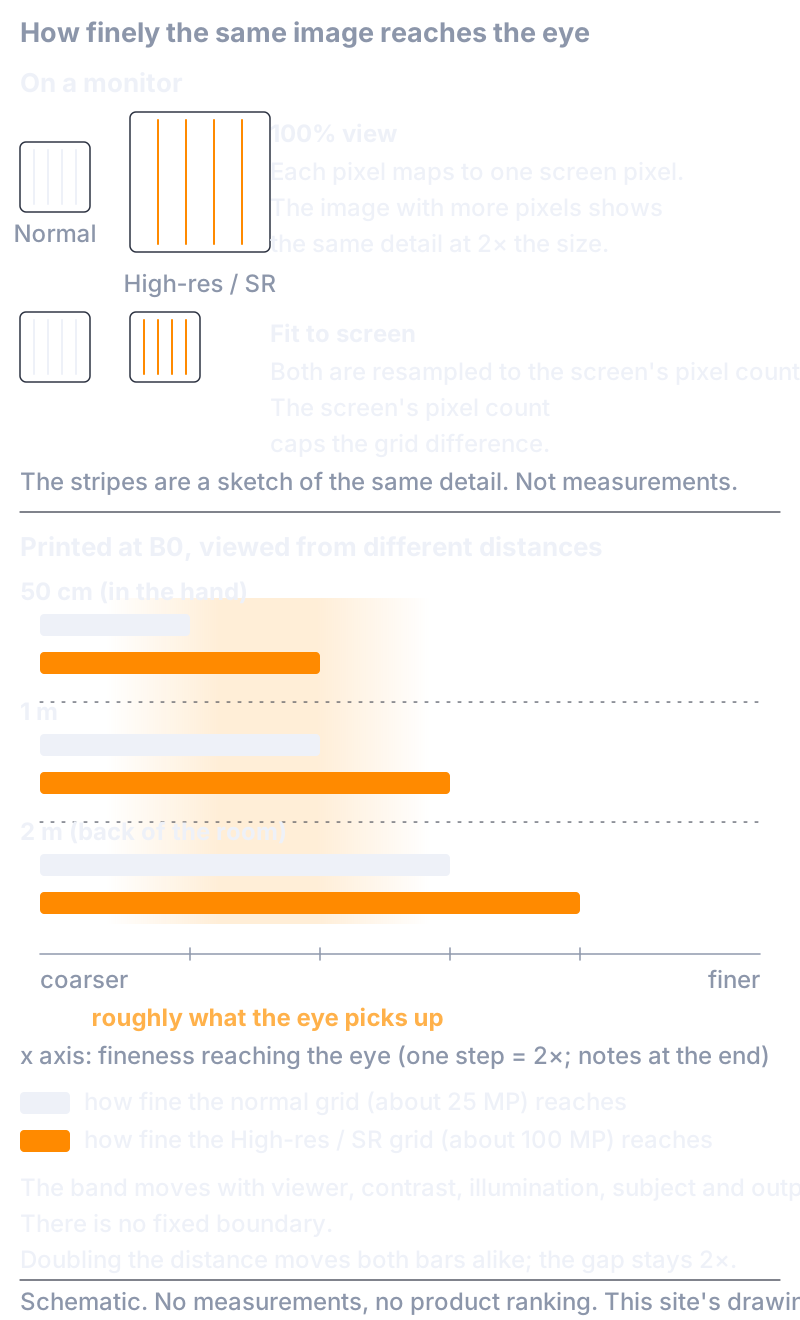
That the 100% view is an inspection condition rather than a viewing condition, and where prints are actually viewed from, is in “What Is Your Circle of Confusion?”, so I will not repeat it here.
High Resolution mode, and pixel-shift multi-shot in general, need the same distinction. With a still subject, solid support and time, they can record more information than a single shot. That is the capture side. Whether that difference shows, or matters, in the output you chose is a separate matter. How it went with my B0 prints is as I wrote above.
“There Is a Difference” and “It Has Plateaued” Are the Same Story
In the film days — perhaps because it was analog — I think that changing any one thing was often visible to the naked eye. In the early days of digital, performance sometimes doubled in a year or two, so differences showed. Now it has plateaued, and it is all much of a muchness. To the point where mixing full-frame and Micro Four Thirds is no problem. I think today's digital has done almost everything there is to do, and there is simply nowhere left for image quality to go.
On the other hand, I also wrote above that “as the print gets bigger, a difference would probably appear.” It may look like a contradiction, but to me it is the same story. There is just less reason to make a fuss than there used to be. Look closely and the difference is there — enlarge to B0 and you will see it. But it has stopped being something to make a big fuss about.
From the sources' side, it comes to this. As long as you look under the same output conditions, the visible gain from recording finer gets smaller and smaller. But that is neither “there is no difference” nor “progress has stopped.” When you crop, when you might one day print larger, when you keep a record — change the use, and that fineness gets used. The difference is real, and at the same time, for what I use the pictures for, it is not what decides. Both hold at once.
What “Image Quality” Means to Me
So where is my own line?
If I were to enlarge big, B0 is the realistic maximum, once cost is considered. For the time being, as long as there is no real drawback to printing at this size, I do not intend to chase resolution and the like. There is also the matter of not wanting to fill up my hard drives.
If someone asks what “image quality” means to me in a word, this is what I answer today.
Is the color — the tonality, really — to my taste? Are the tones rich, in color and in brightness? Does the photograph have a sense of depth?
And when I judge that a photograph has “come out with good image quality,” what am I looking at last?
The feel of it, I think.
Having just written “look closely and the difference is there,” what I look at last is something else. That is not to say I take resolution lightly. It is only that, at the moment I judge a photograph finished, what I am looking at is not the amount of detail.
My Answer to “What Decides It”
What decides the “best” image quality in 2026?
Not the ceiling of what the camera can deliver. The ceiling has certainly gone up. What I changed when I moved to a high-megapixel camera was not how I shoot, but where I keep the data. Set up the tripod, use the cable release, hold it down with my body in wind, decide the final picture first, and allocate the ISO, the aperture and the shutter toward it. The way of deciding has not changed since my 4×5 days. What has changed is how high the ceiling is, and how finely I can see.
The image quality a photograph needs is decided by the photograph. A magazine page, or B0? Moving, or still? Deep, or shallow? Once that is decided, the tripod, the ISO, the aperture, the shutter and any multi-shot compositing all find their place. And a photograph that was not taken cannot be made afterward.
So, after the shot: what can be fixed later in RAW, and what cannot? What was not captured, movement that did not stop — can those be made afterward? That is for the next article.
For Those Who Want to Know a Little More
The conclusions this article needs are complete above. What follows is supplementary, for those who want a closer look at the grounds for what the main text kept short, and at what is not known. There are no new claims.
How Finely the Same Image Reaches the Eye
These are the numbers behind the figure in the main text. The GH6's normal capture is 5,776 × 4,336 pixels; its High Resolution mode at maximum is 11,552 × 8,672 pixels; Photoshop (Camera Raw) Super Resolution doubles width and height, giving the same 11,552 × 8,672 pixels. Fit a 4:3 image by its short side into B0 (the JIS B0 common in Japan is 1,030 × 1,456 mm; ISO B0 is 1,000 × 1,414 mm — I have not checked which my prints were), and the long side of the image comes to roughly 1.33–1.37 m. The normal capture gives about 4.2 pixels per millimeter (about 107 ppi); High Resolution and Super Resolution about 8.4 (about 214 ppi).
How fine a pattern this pixel grid makes in the eye is proportional to viewing distance. Expressing fineness in the eye as “cycles per degree,” the limit of the normal capture's grid is about 18 at 50 cm, about 37 at 1 m, and about 73 at 2 m. High Resolution and Super Resolution are twice that. The 100% view is separate from this conversion: it maps pixels one-to-one onto the screen's dots, so an image with more pixels appears more enlarged.
What I want to note is that this is “how fine the grid reaches,” not “whether the detail can be seen.” Whether it can be seen is decided by how much contrast the stages before it — lens, focus, blur, atmosphere, compositing or estimation, printer and paper — leave at that fineness. Nor is there a single fixed number for the fineness the human eye can pick up. Visual-acuity figures are the definition of an eye chart, not the boundary at which photographic detail becomes visible, and they move by several times with conditions. A study measuring how far detail can be seen on a print is, as far as I could find, not to be found.
Stabilization “Stops” Are Values Under Test Conditions
The “stops” of image stabilization are values measured under the conditions laid down in the CIPA standard (DC-011-2024): a specified vibration and focal length, and a blur criterion (changed from the earlier standard's 63 µm to 20 µm). The GH6's “7.5 stops,” for example, is noted as CIPA-compliant at a focal length of 60 mm (120 mm in 35mm terms) with a particular lens. It is no guarantee against wind, resonance with a tripod, shutter shock, subject movement, or at other focal lengths. As for whether to leave stabilization enabled on a tripod, there are camera manuals that recommend it on a tripod while adding, conditionally, that “with some tripods, depending on shooting conditions, off may be the better choice” and that “settings vary from lens to lens” (Nikon's online manual for the Z8).
High Resolution and Super Resolution: Same Pixel Count, Different Contents
The GH6's High Resolution mode shoots a continuous sequence while shifting the image sensor and composites the frames in camera into an image of up to about 100 megapixels; it also works handheld. Photoshop (Camera Raw) Super Resolution estimates an image of twice the width and height (four times the pixels) from a single image. The resulting pixel counts are the same, but one adds information actually recorded at shifted sensor positions, while the other estimates from the contents of one frame. Multi-shot compositing presupposes a still subject, solid support and conditions that allow merging, and the makers themselves note that movement, wind, atmospheric shimmer and changes in brightness can break it. Nor does the nominal pixel count of the composite mean the same “effective detail” as a single capture of that pixel count. I will not go further into the mechanism here.
Data Volume and Storage
Record more finely, and file size grows in proportion. The factor varies with RAW bit depth and whether compression is used, but the direction does not. Storage, and its long-term reproducibility, has become as practical a cost in a 2026 system as the capture stage. In that sense, “Whoa — the files are huge!!” at the start of this article is also its first conclusion.
On the Word “Allocation”
What I called “allocation” in the main text is the analytical framework of this series, not a term with a long history in photography. It is a way of looking at the amount of light, the lens and aperture, focus, blur and support, how the sensor slices, the processing, and the output and viewing conditions as a row of stages, and sorting out what is lost at each stage and what cannot be brought back. I will explain it again in the parent article of this series, when 1995 and 2026 are set side by side in the same frame.