Sidekick Lab · Photo Critique AI

Ichiro Murata's critique style, experienced through AI

Ever finished a shoot and thought "I'm not sure this one worked"?
This AI critique gives you an objective second look at your work.

Upload a photo and get notes on composition, visual flow, use of negative space, how clearly the subject reads, and what to improve.

Note: this reflects one photographer's personal perspective, translated from Japanese.
This tool is built on the specific critique style and vocabulary of Ichiro Murata, a Japanese photographer with over 10 years and 10,000+ critiques of experience — not a generic or culturally-neutral critique framework. It is his particular way of seeing photographs, carried over into English as faithfully as possible.
※ This is an AI critique for checking your composition objectively, not a critique from Murata in person.
📐 Composition 👁 Visual flow ⬜ Use of negative space ☀️ Exposure & tonal impression 🌟 Subject clarity 💡 Improvement points

Currently free to try, so you can get to know Sidekick Lab.

📷

As a working photographer, I've done over 10 years and 10,000+ critiques of other people's work.
What I keep coming back to, again and again, is the idea of composition, visual flow, and image structure.
I wanted more people to be able to experience that perspective, more easily.
That's why I built this AI critique.

— Photographer Ichiro Murata
Here's an example of what you'll get back

Sample critique
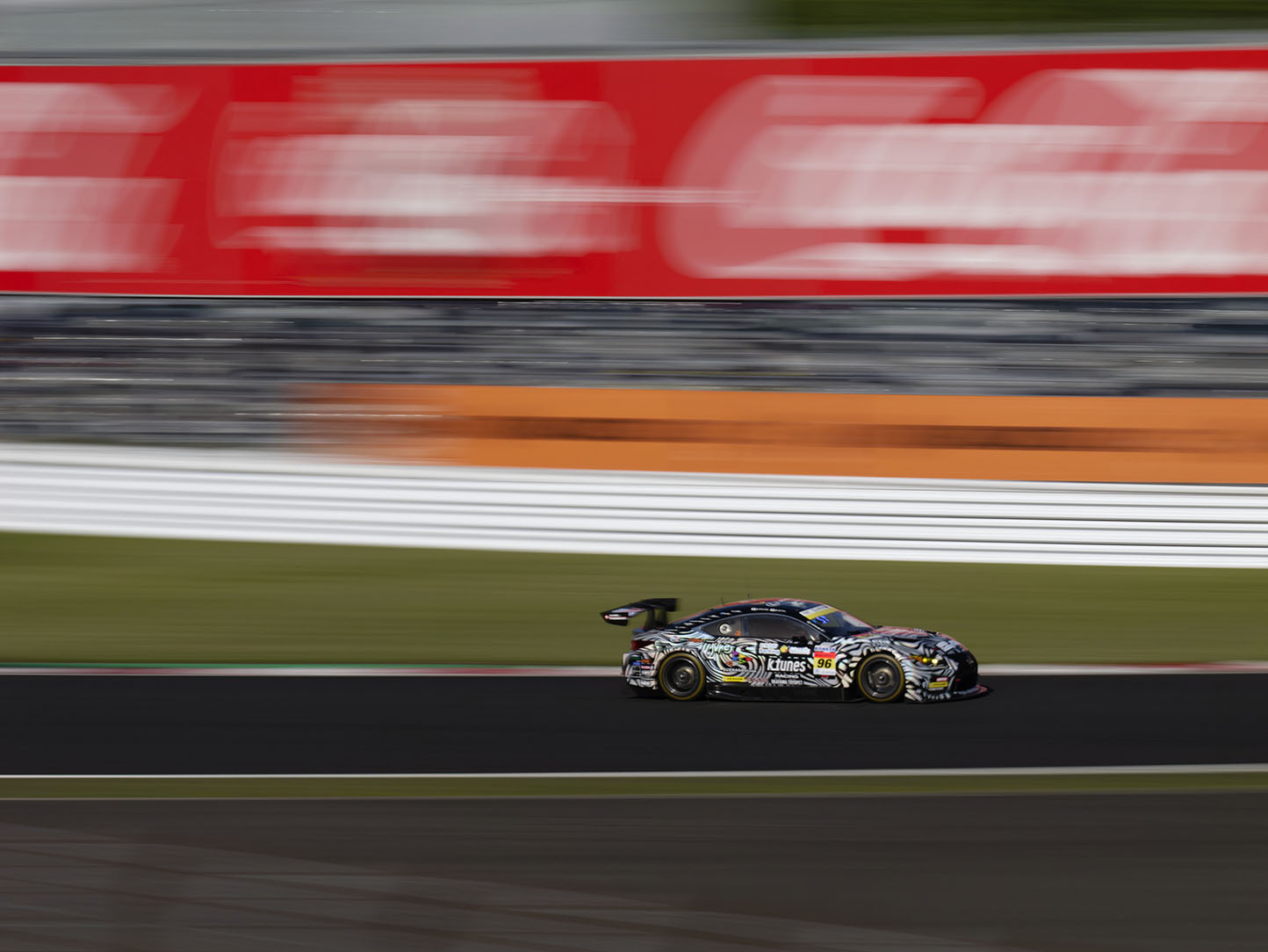
Panning shot sample

A panning shot — nice challenge to take on. You've got a real sense of speed here, and the motion blur is working well. But it's a bit of a shame... Looking at the frame, the top half — the grandstand in the background — takes up too much of the space, so the actual subject, the race car, ends up feeling small by comparison. The car sits center-right, quite low in the frame. Panning uses background blur to express speed, but the car — your subject — should still sit near the center of the frame, at one of the rule-of-thirds intersections. Right now it's too low, so the viewer's eye goes to the grandstand above it first. Next time, try composing so the car lands closer to the center, around the ③④ intersections. If you can balance the background motion against the car's position, you'll get a panning shot with a lot more impact. Keep at it — you're on the right track.

This is the kind of format you'll get: what's working, and what to improve.

What this AI can tell you
  • Composition clarity
  • How clearly the subject reads
  • Visual flow
  • Use of negative space
  • Tonal/exposure impression
  • Improvement points
Hard to judge
  • Precise focus accuracy
  • Whether AF succeeded
  • Precise noise levels
  • Fine RAW-development values
  • Specific layer operations
  • Whether it would place in a contest
Information collected
Your Google account display name / email address
Purpose of use
  • Identifying users
  • Tracking usage limits
  • Support
  • Service improvement
  • Preventing misuse
※ Uploaded photos are sent to Anthropic's Claude API (an external service) to generate the critique.
Read the Privacy Policy →

Checking...

You've used this week's critiques

This week's usage
0 / 5 tickets
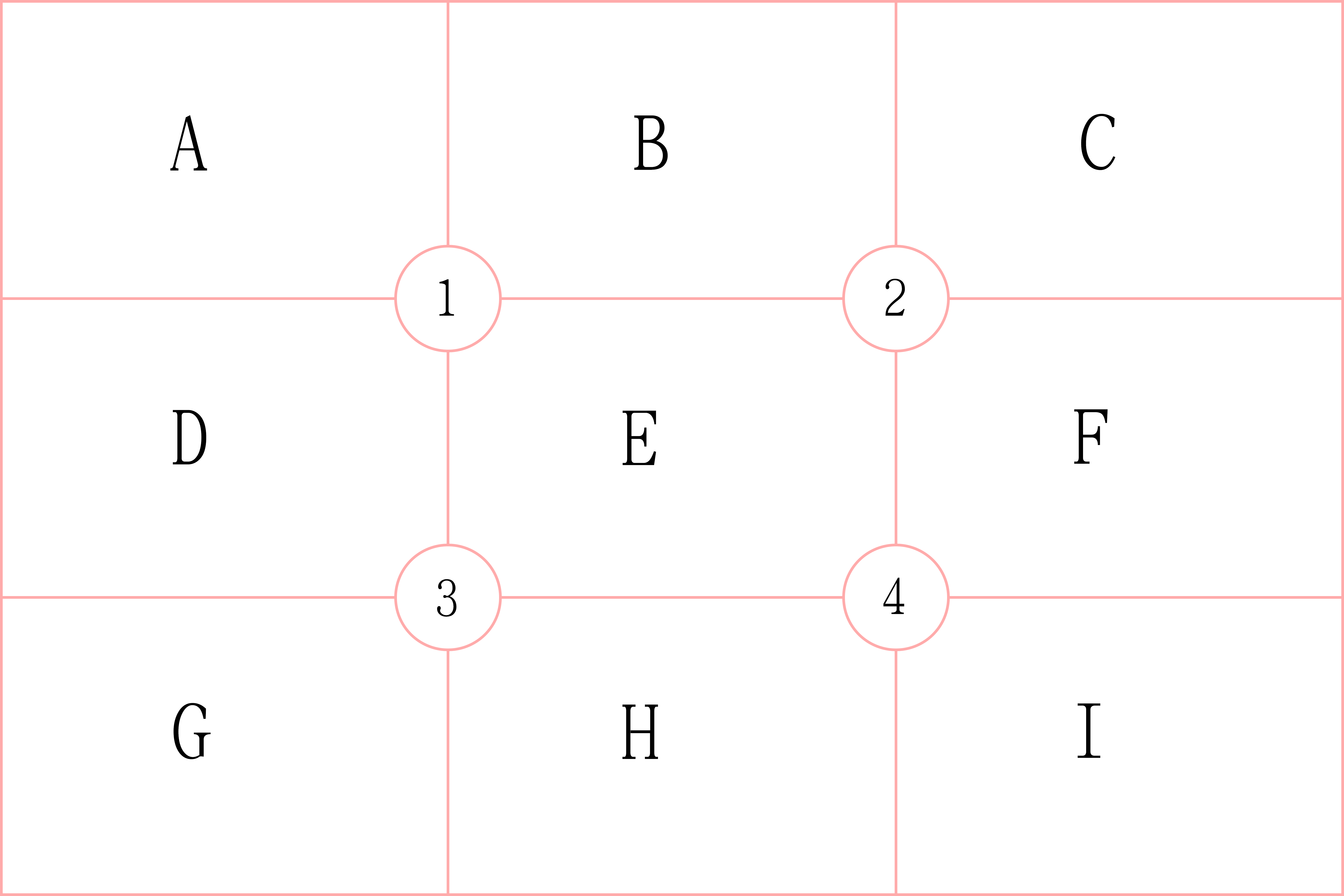
What do the "A–I" and "①–④" in the critique mean?

The critique describes position by dividing the frame into a 3×3 grid. A–I refer to the nine regions, and ①–④ refer to the four points where the rule-of-thirds lines intersect.

Diagram explaining the A-I regions and ①-④ intersection points

Upload a photo

📷

Click or drag and drop a photo
JPG / PNG / WEBP supported (max 10MB)

Preview

Uploaded photos are sent to Anthropic's Claude API (an external service) to generate the critique.

Generating your critique...

Ichiro Murata's critique

Ask about this critique (consumes 1 ticket per question)

Generating an answer...
Three steps for engaging with your photos
1
STEP 1 · You are here
See your photo — AI Critique
Get an objective look at composition, visual flow, and negative space. Built on Ichiro Murata's critique experience.
2
STEP 2
Finish your photo — SideKick
Cut down on post-processing fatigue and raise the finished quality. Photoshop scripts that speed up finishing work.
3
STEP 3
Shoot & think — Workshop
Learn the full flow of making a photograph, from the shoot to the finished piece. (Japanese-language workshop.)
See the Workshop →

A photograph doesn't improve
just by shooting it, or just by finishing it.

Seeing, finishing, shooting.
It's moving between all three
that gradually changes the work.

Sidekick Lab is a place for that.