⭐ Sidekick Star — Photoshop Script for Star Landscape

Still removing airplane trails
one frame at a time?

How many days does trail removal eat after a single night shoot?
Sidekick Star automates the exhausting part of star-landscape post-processing in Photoshop — airplane trail removal, Milky Way development, light-stacking — all handled by the script.

✈ Auto Airplane Trail Removal 🌌 Milky Way Processing 🎞 Film Finish ⚡ Full Light-Stack Automation

No credit card required · Full features · 3-month trial
Purchase price ¥9,800 (one-time, tax included)
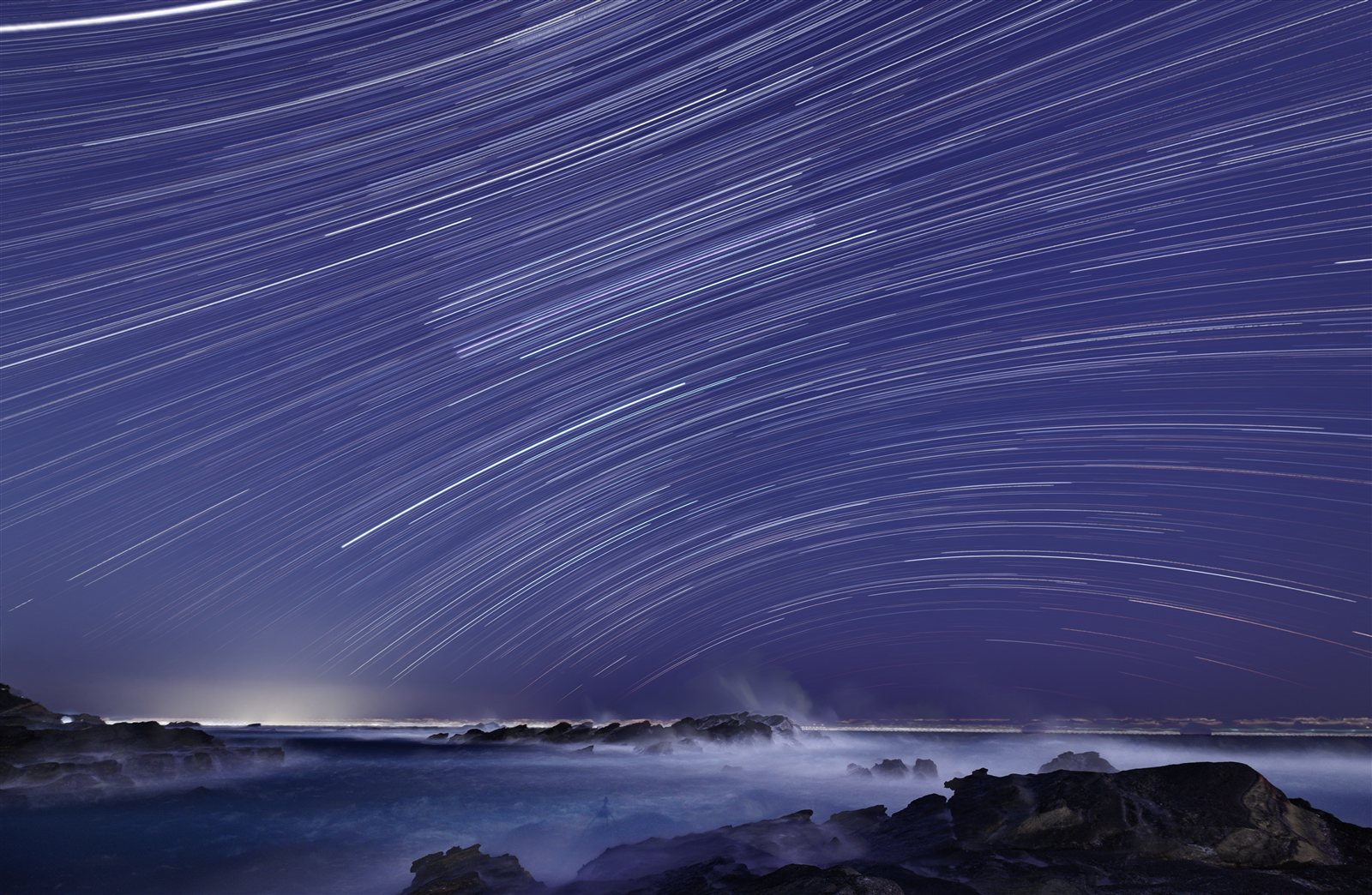
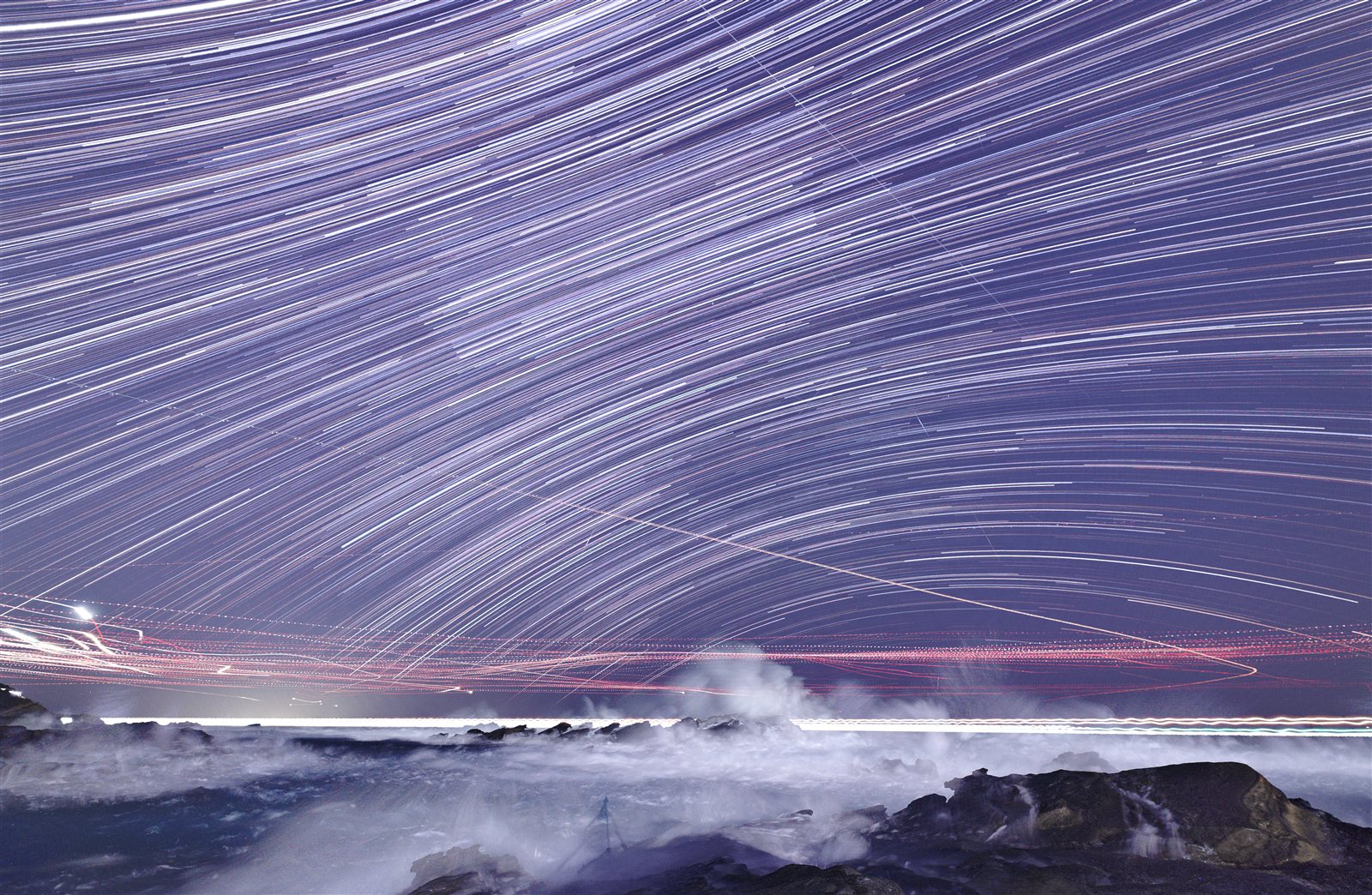
After Sidekick Star — airplane and satellite trails removed, only star trails remain
AFTER — Sidekick Star
Before — airplane and satellite trails visible in the stack
BEFORE
🏆 1X Award ×5
📖 6 Published Books
🎤 CP+ Seminar Speaker
⭐ 20 Years Star Landscape
🆓 3-Month Full Trial · No CC
Before / After — Airplane Trail Removal

One week of hand work,
done overnight by your PC.

Detects and removes only artificial light trails — airplanes, cars, ships — from light-stacked source frames. Twenty years of trail-removal judgment, distilled into a script.

↓ Source frame Airplane trails removed ↓
Before — airplane and satellite trails remain in the light stack
✈ BEFORE
Red streaks (airplanes, satellites) spread across the entire stack
After Sidekick Star — only star trails remain
✓ AFTER — Sidekick Star
Only star trails remain. A problem unsolvable in the film era, solved algorithmically.
1 week+
Manual processing time
Overnight
With Sidekick Star
2-stage
Removal process (pre- and post-stack)
Proprietary
Algorithm (method not disclosed)
💡 No generative AI is used. An AI model detects the airplane trails, but removal uses the same pixel-replacement logic as manual Photoshop work — pixels are sourced from other frames you shot, not hallucinated.  ⚠ Meteors are also removed. Remove frames you want to keep before running the script.
Star Landscape — Post-Processing Reality

Does the "post-processing grind" sound familiar?

Star landscape photographers lose the most time not in the field, but in the repetitive work that comes after.

"Another weekend gone to trail removal. Three hours to the location, two weeks dissolving in front of Photoshop."
— The reality for anyone doing light-stacking seriously
"Same operation, over and over. The photography I fell in love with has become post-processing labor."
— The problem that gets worse as frame count grows
"I developed the RAW and the Milky Way nearly disappeared. Trial and error every single time."
— The emotion at the scene never appears on screen
"Light-stacking at 100% is always a disappointment. It never looks like film did."
— The inherent challenge of digital light-stacking
✈️
A week just for trail removal

One night of shooting, one week of manual work — making the same judgment call hundreds of times.

🌌
Milky Way won't appear

You know you captured it, but straight RAW development makes the Milky Way nearly invisible.

〰️
Star trails break between frames

The digital curse — gaps appear in star trails between frames. Film never had this problem.

2 hours shooting, 3 days processing

The creative finishing you actually wanted to do gets buried inside the repetitive grind.

This exhaustion can end with a Photoshop script.
Let the tool handle the repetition. You focus on the creative work only you can do.
▶ Free Download
Before / After — Milky Way Processing

Same RAW, same single exposure.
The difference is development judgment and enhancement.

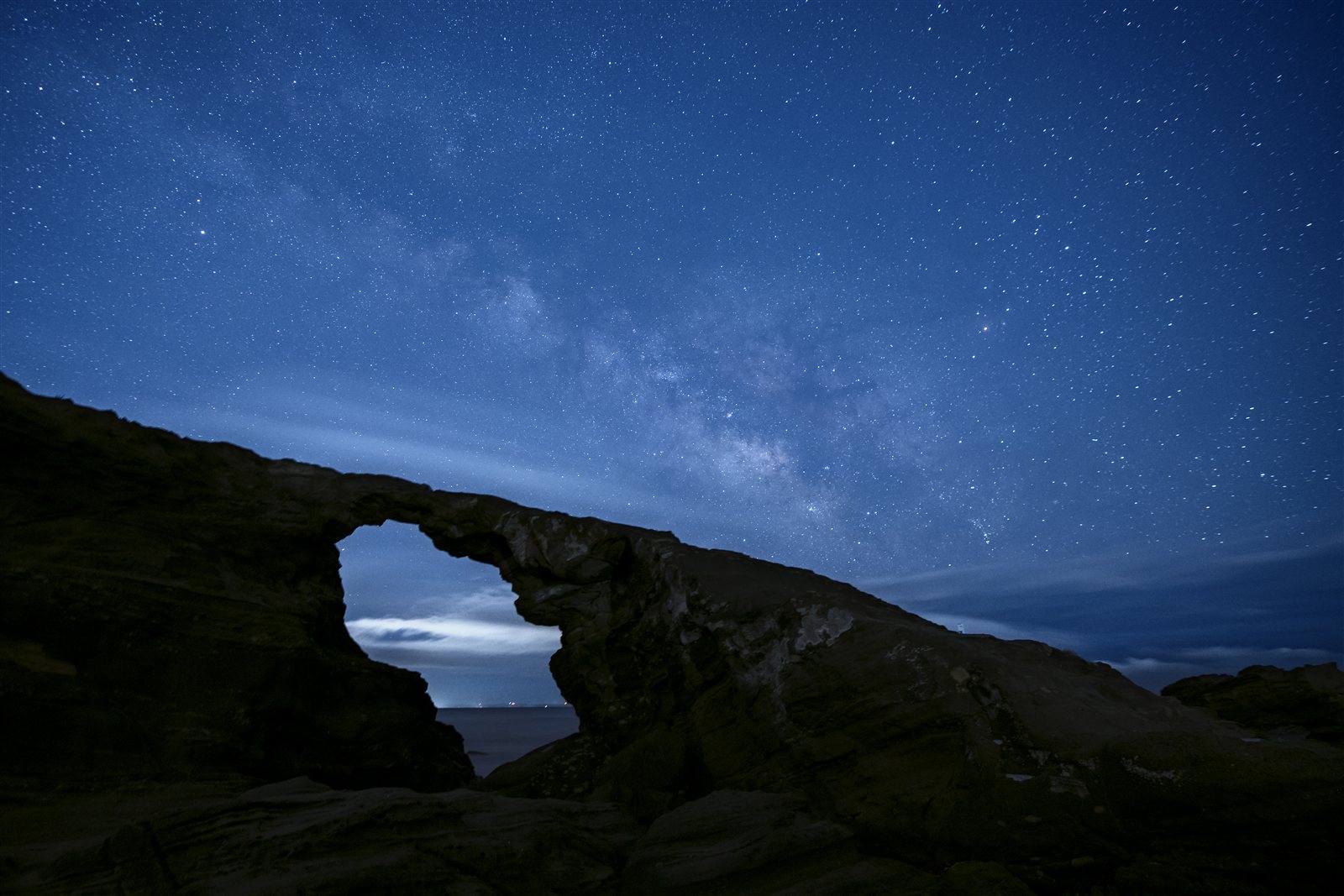
"I shot it but the Milky Way won't appear" — comparing Photoshop default RAW development against Sidekick Star development plus Milky Way enhancement.
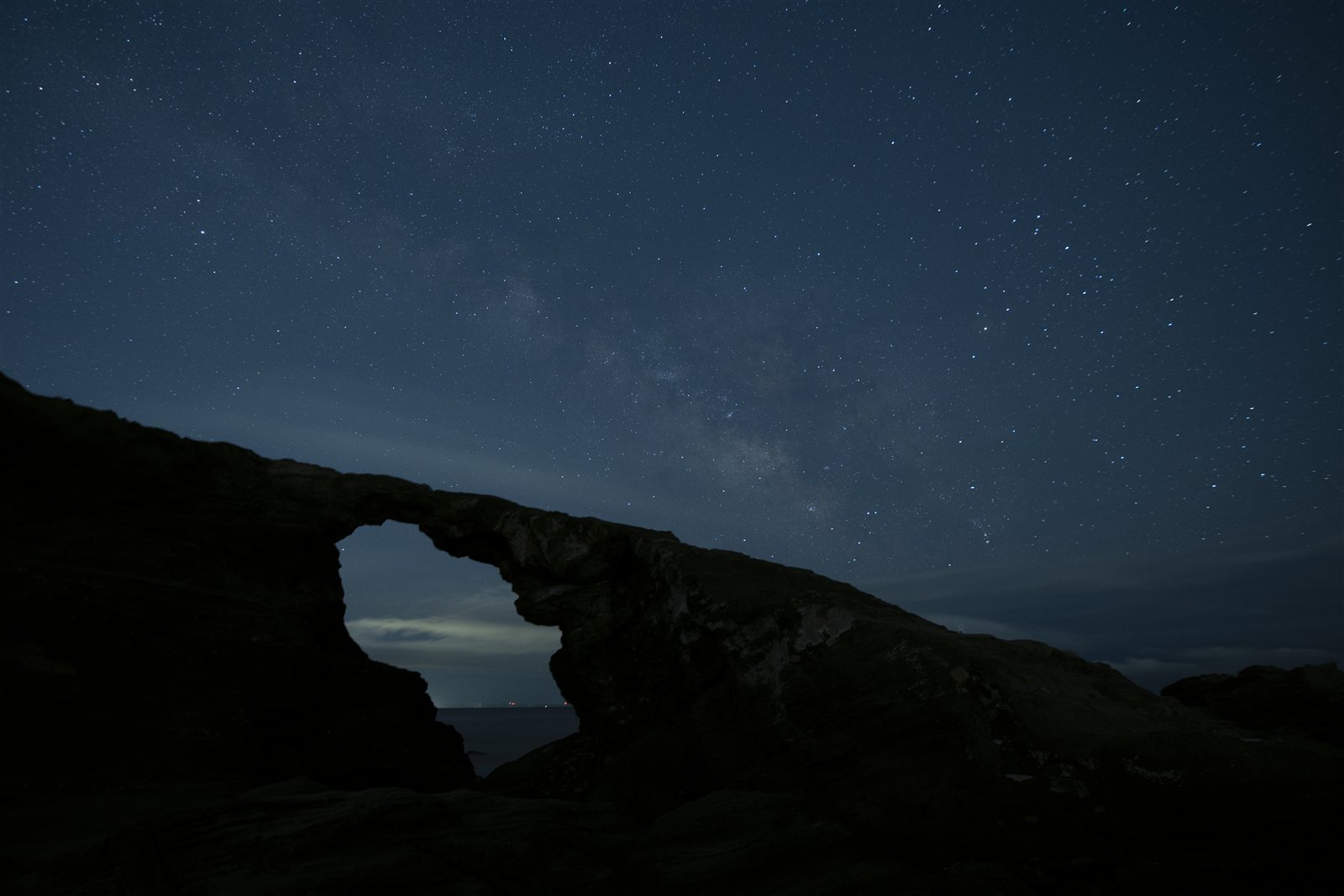
Default Photoshop RAW development — Milky Way barely visible
BEFORE — Default RAW Development
Milky Way nearly invisible. Many photographers gave up thinking they hadn't captured it.
After Sidekick Star Milky Way development and enhancement
AFTER — Sidekick Star + Milky Way Enhancement
From the same RAW. Recaptures the emotion you felt at the scene.
How It Works

Not an "AI tool" —
a workflow assistant for the field.

Sidekick Star runs as a Photoshop JSX script. No cloud upload. Everything stays on your machine. It does exactly what you would do by hand — just without you having to be there.

🏠
Fully local — no data sent anywhere
Your photos never leave your PC. Everything runs inside your Photoshop.
📐
Field judgment encoded into code
20 years of decisions — test frame detection, stack settings, trail detection — baked into the script.
🛠
Built by a photographer for himself
Designed from "what exhausts me personally," not "what might frustrate users."
⚡ Photoshop JSX Script
01
Put RAW files in a folder
Use your shoot data as-is. No special conversion or prep needed.
02
Launch the script from Photoshop
Pick it from the Scripts menu. Settings save to JSON — one click to reproduce next time.
03
Hit start → let your PC work while you sleep
Test frame exclusion, stacking, light-stacking, airplane trail removal, film finish — all automated.
04
Wake up to a finished light stack
No airplane trails. Film finish applied. All that's left is your creative retouching.
Features

Everything that drains you in post-processing, covered.

Not just trail removal. Sidekick Star handles the entire repetitive workflow after a night shoot.

Airplane, car, and ship trail auto-removal

A proprietary 2-stage process that detects and removes artificial light trails from light-stacked source frames. 1 week of hand work → overnight. Method not disclosed.

🌌

Milky Way development and enhancement

From RAW development through Milky Way enhancement — Murata's own workflow, encoded as a script. Solves "I shot it but it won't appear."

🎞

Film finish — broken trails into continuous arcs

Converts broken star trail dashes into smooth continuous arcs using pixel-count-based auto-calculation. Solves the digital light-stacking curse.

📂

Test-frame exclusion, file sorting, light-stacking — all automatic

Statistical analysis of shooting intervals to auto-exclude test frames. Rename, stack, and light-stack in one pass. JSON settings reproduce your setup with one click next time.
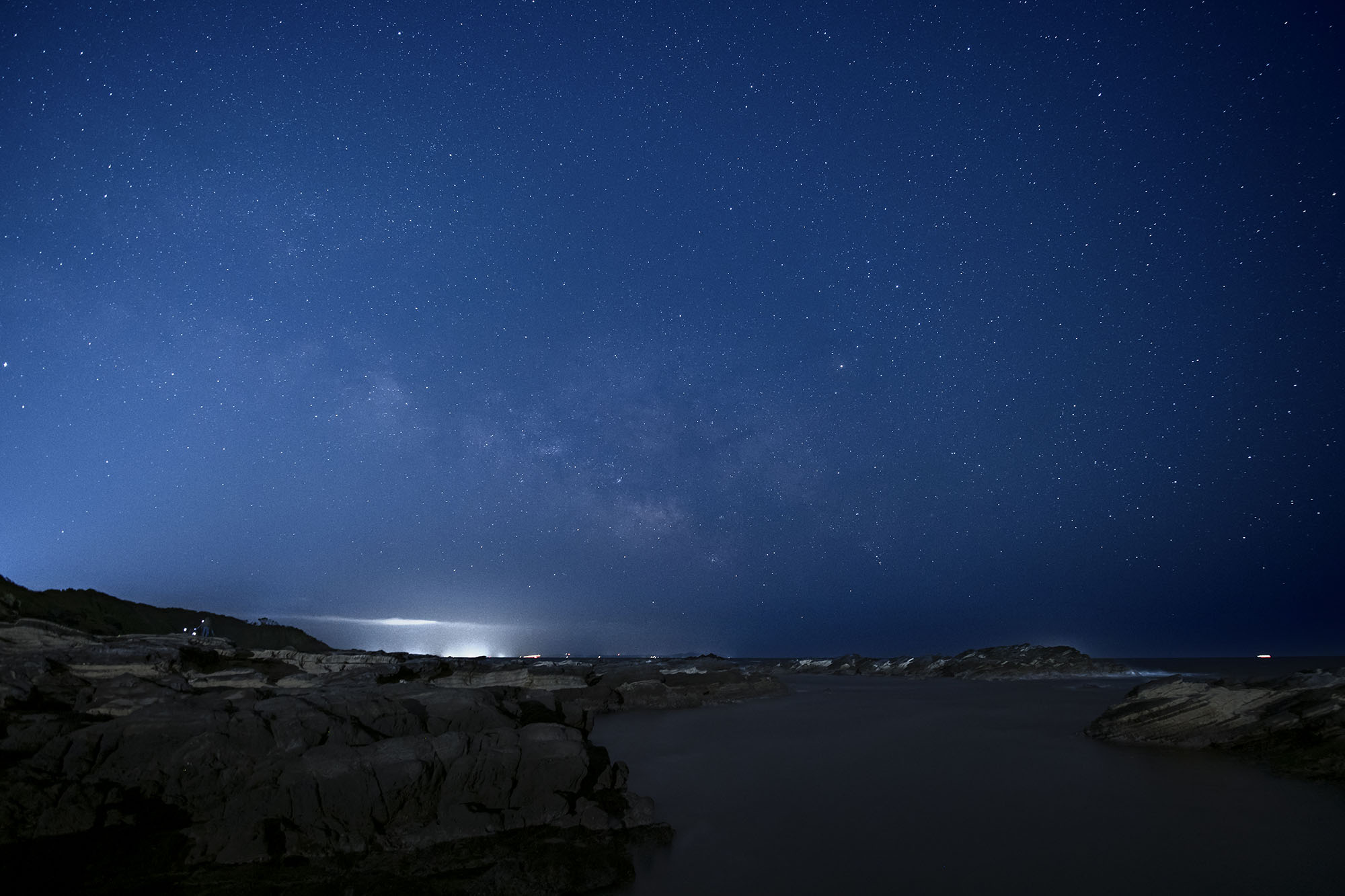
1X Award winning work by Ichiro Murata — star landscape with Milky Way
🏆 1X Award — Ichiro Murata
Developer

A tool made by a photographer
who spent 20 years grinding through the same work.

Ichiro Murata has been shooting star landscapes in the field for over 20 years. Sidekick Star grew out of solving the exhaustion he actually faced in his own workflow — not hypothetical user problems.

"What am I personally worn out by?" — that's where the design started. That's why it works as a real-world workflow tool, not a demo.

🏆
1X Award ×5
Multiple wins on one of the world's most selective photography platforms.
📖
6 Published Books (Genkosha et al.)
Author of technical books on star landscape photography.
🎤
CP+ Seminar Speaker
Presented star landscape post-processing techniques at Japan's largest photo trade show.
💡 This is not a "generative AI" tool

To be precise: an AI model is used to detect airplane trails. But removal uses no generative AI or image synthesis of any kind.

STEP 1 — Detection
AI model identifies airplane trails
STEP 2 — Removal (the key part)
Pixels from other frames replace the trail pixels

"It does the same thing I'd do manually in Photoshop. No generative AI for removal — I pull pixels from other frames shot at the same location and overwrite the trail."

— Ichiro Murata (developer)
Roadmap

A living tool, not a finished product.

I won't claim something works if it doesn't. Here's the honest current state. Features will continue to grow after purchase.

Done Airplane/car/ship trail removal (2-stage) · Film finish Available now
Done Test-frame exclusion · File sorting · Stacking · Light-stacking Available now
Done Milky Way development · Enhancement · Sky mask auto-generation · JSON settings Available now
Done Sky mask · Custom sky mask import (advanced) Available now
Near done Trail removal AI enhanced (theoretical full removal · improved bad-weather handling) Quality may drop in bad weather
Support

You're not on your own when something goes wrong

Technical issues, setup questions — I handle them directly.
A few real examples:

CASE 01

"Not sure if my GPU is being recognized. Airplane removal errors out and large batch jobs crash."

✓ Resolved

Confirmed RTX environment with a GPU check tool, distributed a patched script, adjusted block count for stable batch processing. Solved same day.

CASE 02

"AI mask generation finishes at 0/227. No idea what the error means."

✓ Resolved

Distributed a fix that auto-falls back to CPU when GPU is unsupported. Bug fixed and pushed to all users.

CASE 03

"Developed in another app first and now Sidekick won't run. Worried I did something wrong."

✓ Resolved

Walked through deleting the output folder and re-running. Solved in minutes. Original RAWs were untouched.

After purchase, reach me on X (@murata_photo) or the FAQ page any time.

⭐ Sidekick Star
Try it for 3 months
with your own material.

No credit card · Full features · Cancel anytime
Confirm "trail removal just got easier" with your own eyes — then decide.

▶ Free Download No credit card · Full features · 3-month trial
— or —
💳 Buy Now (¥9,800 tax included)
Manual: Japanese PDF  /  English PDF  ·  Contact: murata@mbg.nifty.com
License key delivered by email after purchase (usually within a few hours)